How to Update Payment Method
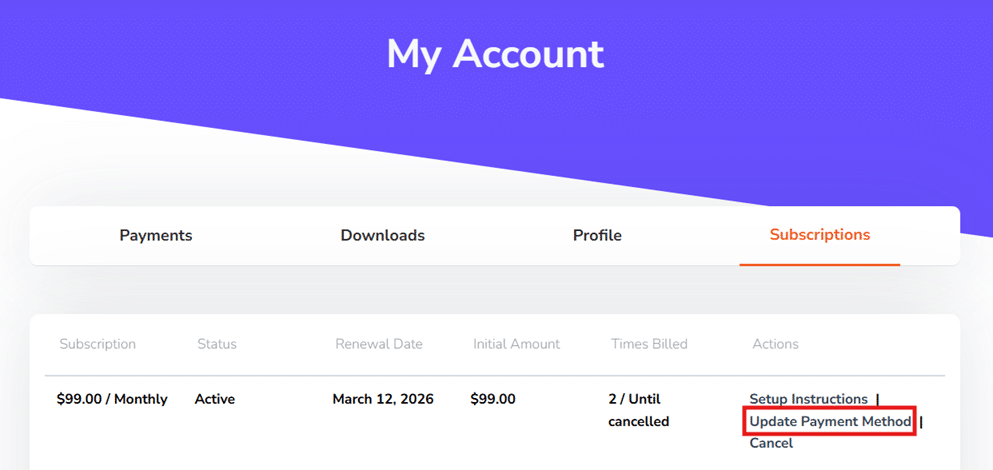
You can update your payment method by logging into the My Account > Subscriptions section of the website.
Once your payment method is updated, please contact our support to process failed payments in order to reinstate service immediately.
👉 If you signed up using PayPal, the source of payment is managed within your PayPal account and not on our website. We no longer support PayPal for new subscriptions, due to its limitations.


Related Articles
-
AI Title Search: Find Amazon Products Without UPC/EANs or ASINs
 Troubleshooting & FAQ
Web
6 days ago
Troubleshooting & FAQ
Web
6 days ago
-
Historical Trend Periods Now Adjustable in the Grid
Troubleshooting & FAQ
Web
4 months ago
-
Override Incorrect Multi-Pack Quantities in Bulk
Troubleshooting & FAQ
Web
5 months ago
-
Show Premium Data Selectively For Faster Scans
Troubleshooting & FAQ
Web
6 months ago
-
Metric/Imperial Units, Digital Services Fee & Storage Fee Transparency
Troubleshooting & FAQ
Web
6 months ago
-
Grid Autosave
Troubleshooting & FAQ
Web
7 months ago